
Definition
A field 'email' is used to Send a confirmation or Notification to an user/admin

Settings
TextArea fields Options could be a Multiple Value
Default Separator is: Enter ( "\n" ), comma ( "," ) or dot comma ( ";" )
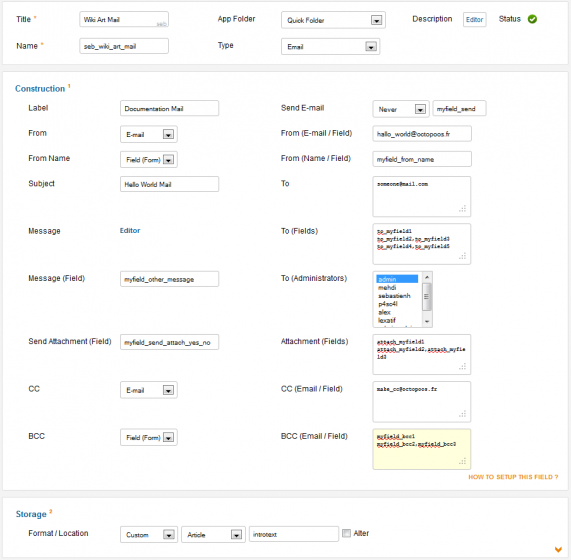
From Params
Define Email Sender
- Default one: used your Joomla default configuration
- Email or Name: complete the field right above the parameter with an Email/Name
- Field(Form): complete the field right above the parameter with your Form 'fieldname', this field MUST be in your Form

Message Params
Send:
- Static Value: Never/Submission/Edition/Alway
- Dynamic Value: Put your fieldname right above the Static Value ( override it ), the value must be an integer:
- Never = 0
- Submission = 1
- Edition = 2
- Alway = 3
Subject:
- Static Value: Hello World...
- Joomla Value: [sitename][siteurl][username]
- Dynamic Field: Put your field with this synthax #fieldname#
Message:
- Static Value: Hello World...
- Joomla Value: [sitename][siteurl][username][activation]
- Render All Fields: [fields]
- Dynamic Field:
- #fieldname#
- $cck->getAttr('fieldname'); Replace 'Attr' by the Real Attribute, ie: Label, Value, Text, Html ...
- {del fieldname} Hello World {/del} or {del #fieldname#} Hello World {/del}
- J(translate) used Jtext ( check your language file from admin/site )
- [date(format)] use the PHP one
Here a Sample with default Article:
Hi #art_title#,
I have been stored in this catid: $cck->getValue('art_catid');
{del fake} Delete fake is not a valid value {/del} Line Blank
{del id}Versailles, [date("F j, Y, g:i a")] {/del}
J(Best Regards) translate it
J(Default) done
[fields]
Message Override:
- Just put your fieldname in that option
Attachment:
To join a file with your mail. You have to configure two options
- Send Attachment (optional) :
"Option to Attach or not the file"
Put only one fieldname here, as option value=0 for no attachment.
If you don't have a fields (alway attach a file with mail) then let it as blank. - Attachment Fields:
"Your attach file(s)"
Put your fieldnames here, could be mulitple ( cf Tip )
Recipient
Define Email Recipient.
To
- Put your email, could be mulitple, ( cf Tip )
To (Fields)
- Put your fieldnames here, could be mulitple ( cf Tip )
To (Admin)
- Select your admin, could be mulitple, CTRL+Select
Copy CC & BCC:
- None
- Emails: complete the field right above the parameter with Email(s), could be mulitple ( cf Tip )
- Field(Form): complete the field right above the parameter with your Form 'fieldname', this field MUST be in your Form, could be mulitple ( cf Tip )