
Installing SEBLOD CCK (jSeblod CCK)
Here
are the steps to install SEBLOD CCK onto your web server. After reading
this documentation, you should be able to install the CCK.
Needed :
Website with Joomla version >= 1.5.12
PHP5
PHP GD Library (used for image thumb generation)
MYSQL 5, advised >= 5.0.52
Website with Joomla version >= 1.5.12
PHP5
PHP GD Library (used for image thumb generation)
MYSQL 5, advised >= 5.0.52
To
install and configure Joomla, we invite you to read help on
www.joomla.org. Install Steps : You must be loggin in Joomla
administration as Super Administrator. SEBLOD CCK installation is full
automatic. One time installed, SEBLOD CCK can be use directly. If you
have any problem for the installation look on the end of this article.
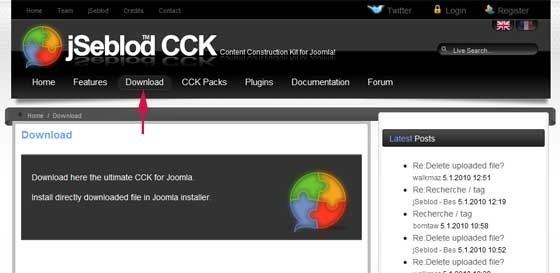
1. Download the latest official SEBLOD CCK version for Joomla 1.5
Store
the file on your computer hard disk. The zip file of SEBLOD CCK weighs
more than 1.5 Mo. SEBLOD CCK installer come from the next Joomla
release, Joomla 1.6. It's optimize to encounter no problem despite the
size of the zip file.
2. Install jSeblod CCK in Joomla!
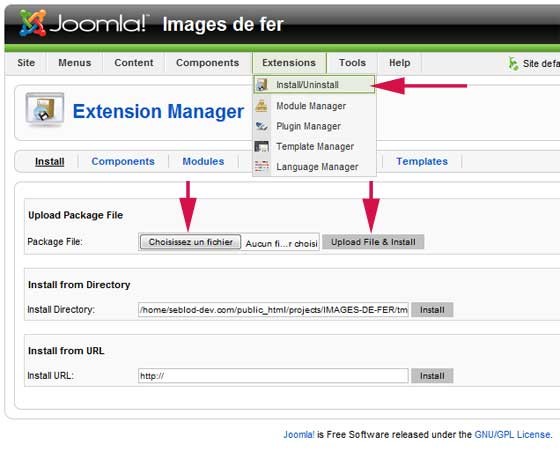
- Go in Extensions Menu > Install/Uninstall
- Click on "Select a file" button
- Select the zip file of jSeblod CCK stored on your computer
- Click on "Upload File and Install" button
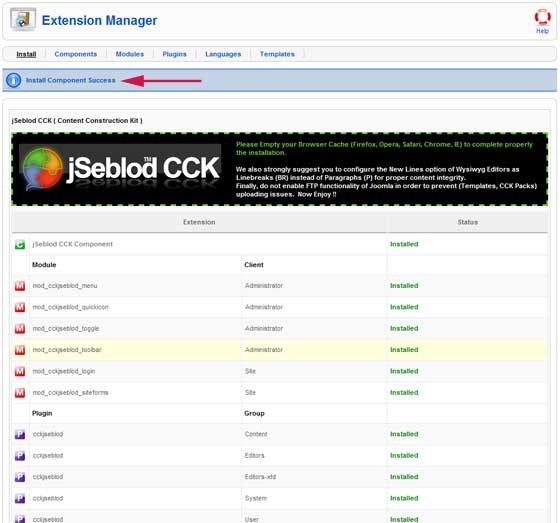
- Wait (it's depend of your Internet connectivity) and you will be see :
The
"Install Component Success" confirm the success of the installation. 1
component, 6 modules et 5 plugins installed and a set of content type
template. Plugins and modules are automatically published (except
jSeblod Extended Admin Menu, cf option).
3. Implement recommendations
- Delete cache of your browser (in case of SEBLOD CCK update)
- In Joomla WYSIWYG Editor that you use, it's best to configure new lines as (BR) instead of (P) (for reasons of integrity of your content) : for TinyMCE (by default in Joomla) go in Extensions Menu > Plugins Manager, click on "Editor - TinyMCE 2.0" plugin and change the "New line" parameter to BR, save
- Don't active FTP function from Joomla to not encounter some problem when you import or export templates and CCK pack.
- Verify that "Content - Cckjseblod" plugin is the first in the list of "Content" type plugin : Menu Extensions > Manage Plugins, Select at the top right with the dropdown list "content" plugin, verify that "Content - Cckjseblod" plugin is in first position or change it to be.
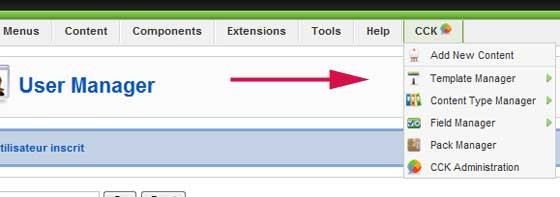
Option: Enable a SEBLOD CCK menu in the Joomla administration menu
You can display in Joomla administration main menu a set of shortcut for SEBLOD CCK. Very useful to win some time.
Alternative Install Method
- Unzip SEBLOD CCK zip file uzing your favorite software into a new folder on your desktop.
- Rename that new folder to jseblod_cck (or any name that you prefer).
- Upload the jseblod_cck folder to your Joomla /tmp directory using your FTP software.
- Go to Joomla Install/Uninstall area
- At Install from Directory, after the /tmp link, add /jseblod_cck. This means, after the link given in the box (which ends with /tmp), add /jseblod_cck after it. (Example, from: /var/www/web1/web/tmp to : /var/www/web1/web/tmp/jseblod_cck)
- Then click Install.
Uninstall jSeblod CCK
- Go on Joomla Install/Uninstall area
- Click on "Component" panel
- Check CCKjSeblod component and click on uninstall button
You don't have to uninstall each module and plugin, all is uninstalled when the component is uninstalled.
If you don't the Joomla toolbar (save, apply, close button...) after uninstallation of SEBLOD CCK, go on module manager, click on administration panel and publish again the module called "toolbar".
If you don't the Joomla toolbar (save, apply, close button...) after uninstallation of SEBLOD CCK, go on module manager, click on administration panel and publish again the module called "toolbar".
Install jSeblod CCK after an uninstallation
If
you uninstall SEBLOD CCK and then want install it again, please use
upgrade package and not install package. The uninstall process doesn't
delete CCK tables. The reason is simple, if you uninstall the CCK by
mistake you'll lose all your work... so let's see that as a security...
Whenever
you're updating your system, it is important that you make a backup in
case of problems. You should backup not just your database, but your
files as well. Of the CCK files, you should backup the template source
files if you've modified them at all. You should also backup the
params.ini file
# UPDATE FROM 1.5. RCx or Stable TO THE LAST STABLE RELEASE #
- Make a backup of your template sources files (if you have made any modification ) or at least “params.ini” (if you have changed template parameters) (1)(2)
- Download the good UPDATE PACKAGE jSeblod CCK 1.5.0 release.
- Go to Extension Manager.
- Browse the jSeblod CCK package, and click on “Upload File & Install”.
- Edit all templates, select the template type (form, content or list) and save.
- If you use fieldX field, edit each field, put in separator and save it. Enjoy !
(1) Note that you can copy templates directly from Template Manager in
order to save them. (2) After new installation or update you can also
choose to not use included templates but a copy. Thus template backup
will not be required before any update. For example, you can copy
“default_form” to “my_default_form” and use it. (and do the same for
all)
If you have problem to update jSeblod CCK try this:
Try to update again jSeblod CCK with update archive file or Update jSeblod CCK from the Joomla tmp directory (follow instructions described in "alternative install method " (but by using update archive) at the end of this document http://www.jseblod-cck.com/documentation/install.html)
Try to update again jSeblod CCK with update archive file or Update jSeblod CCK from the Joomla tmp directory (follow instructions described in "alternative install method " (but by using update archive) at the end of this document http://www.jseblod-cck.com/documentation/install.html)