
Template Introduction
Template engine of SEBLOD 1.x inherits directly from Joomla template engine and so it integrate natively next update of Joomla template engine.
Templates of SEBLOD 1.x manage layouts of contents, forms and lists.
- Automatic Content Template: displays automatically a content with the values of selected fields from the "Content" tab in content type edition
- Automatic Form Template: displays automatically a form with the selected fields from the "Admin" or "Site" tab in content type edition
- Automatic List Template: displays automatically a list filtered by fields selected (see Search Type Manager)
- Custom Content Template: displays a content with the values of fields called in the template
- Custom Form Template: displays a form with the fields called in the template
- Custom List Template: displays a list of contents with the values of fields called in the template
Assign admin, site and content default template by editing the content type.
For beginning use only automatic template like "Default Form" template (for admin and/or site form) and "Default Content" template (to display content).
A major advantage of SEBLOD 1.x is the possibility for one content type to have various fields in the form for site side (front-end) and administration side (back-end), and to display the values of the fields you want in site side. For example, "Please accept the terms" field is only useful for front-end form, "Note of the administrator" field is only useful in back-end form...
Template Generator
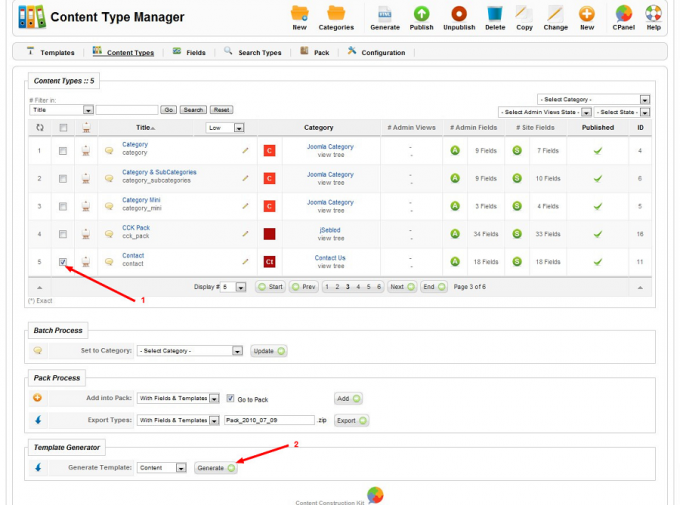
Template Creation
Go to SEBLOD 1.x template manager and click on new button.
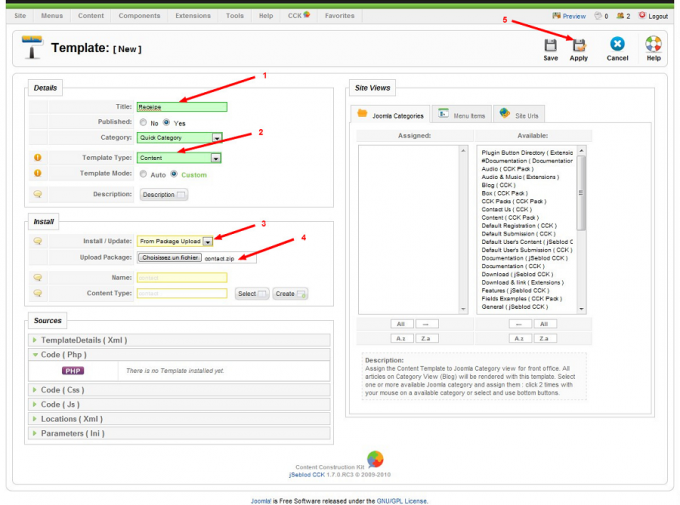
Write a title 1, select "content" template type and custom template mode 2.
"Install / Update" parameter must be on "From Package Upload" 3.
Select the template file downloaded on your computer with Upload Package parameter 4 (name parameter will be automatically filled, it's define during template generator and use in xml file).
Click on apply 5.
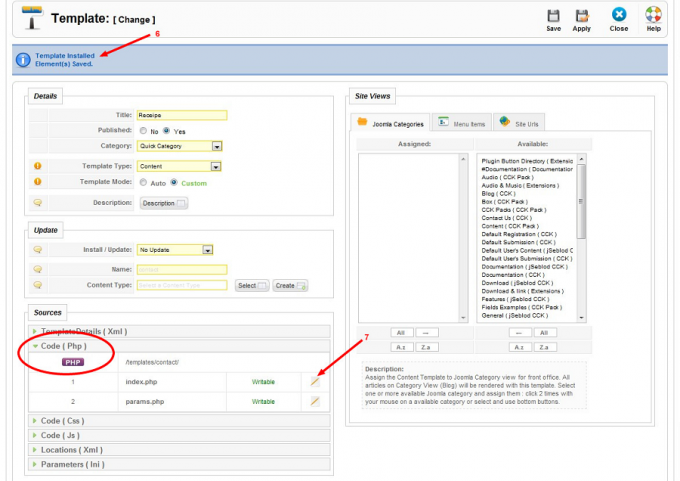
Assign a template to a content type
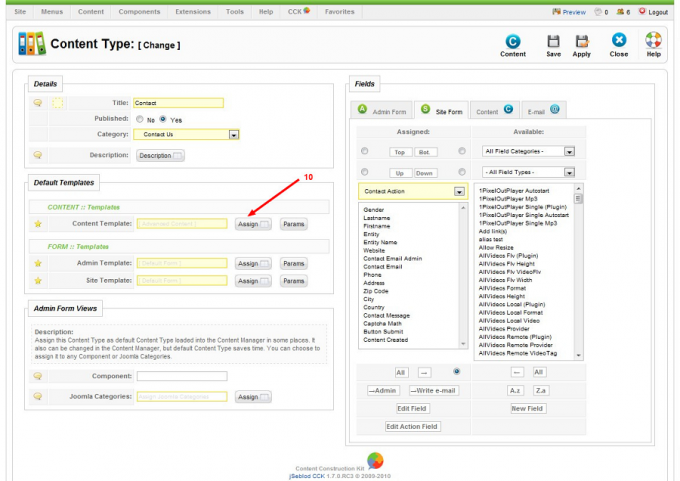
If you want to have a custom content template (index2.php) for introtext part which can be displayed on Joomla category blog view read this: http://www.jseblod-cck.com/documentation/how-to/3969-create-your-own-index2php-content-template.html
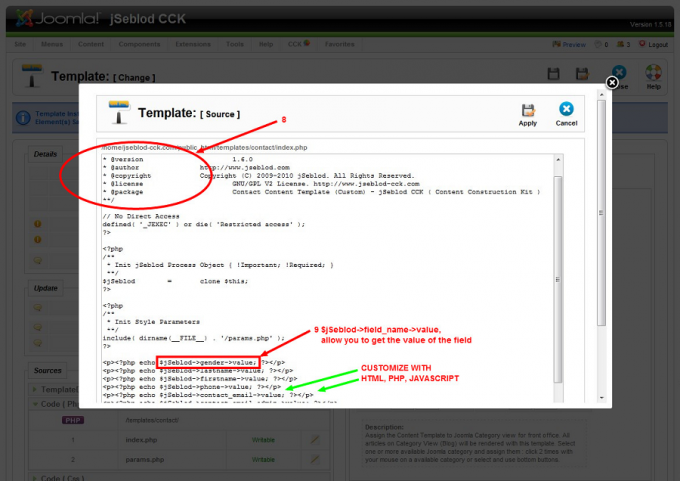
Call fields in your custom template
Call in custom content template any attribute of a field, the value of the field but label, description, maxlenght, style too... This list is not complete.| Attribute | Description |
| General | @$jSeblod->field_name->attribute |
| value | return value of the field (most important attribute) |
| title | return title of the field |
| label | return label of the field |
| description | return description of the field |
| html | return html code of the transformed field * |
| Core com_content | $this->content->attribute |
| id | return numeric identifier of the content |
| title | return title of the content |
| alias | return alias of the content (SEF) |
| state | return published state (Published=1, Unpublished=0, Archived=1, Trashed=2) |
| sectionid | return numeric identifier of content section |
| catid | return numeric identifier of content category |
| created | return creation date of the content |
| created_by | return numeric identifier of the content author |
| created_by_alias | return username (alias) of the content author |
| modified | return modification date of the content |
| publish_up | return begin publication date of the content |
| publish_down | return end publication date of the content |
| access | return numeric identifier of the content access level |
| metakey | return meta keywords of the content |
| metadesc | return meta description of the content |
| art_link | return link to the content (SEF compatibility) |
| editart_link | return link to the content edition |
| Special Core com_content | $this->content->attribute, attributes available in com_content and some modules but not everywhere |
| section | return section title of the content |
| category | return category title of the content |
| author | return author of the content |
| usertype | return group of the content author |
| group | return access level of the content (see access) |
| hits | return hits of the content |
| rating | return vote number of the content |
| User Core | $this->user->attribute, if user is logged! |
| name | return name of the user |
| username | return username of the user |
| return email of the user | |
| usertype | return group of the user |
| registerDate | return registration date of the user |
| Upload Image | @$jSeblod->field_name->attribute |
| value | return path of the image (main) |
| thumb1 | return path of the first thumb image |
| thumb2 | return path of the second thumb image |
| thumb2 | return path of the third thumb image |
| FieldX | @$jSeblod->field_name[$i]->attribute |
| attributes of the repeated field |
@$jSeblod->field_name[$i]->value
@$jSeblod->field_name[$i]->label |
echo @$jSeblod->fieldX_name[$i]->attribut;
}echo @$jSeblod->fieldX_name[0]->attribut;
echo @$jSeblod->fieldX_name[1]->attribut;Get link: @$jSeblod->fieldX_name[$i]['art_link']->value;
...
| External Article | @$jSeblod->field_name['name_of_a_external_article_field'] ->attribute |
| all attributes from all fields of the external article |
@$jSeblod->field_name['artist_title']->value
@$jSeblod->field_name['artist_title']->label @$jSeblod->field_name['art_link']->value (generic link to article) |
| List File | @$jSeblod->field_name->attribute |
| value | return path of the file, all file paths if multiple format |
| download | return link to download the file (supported format: zip, pdf, doc, xls, ppt, exe, gif, png, jpg, jpeg, mp3, wav, mpeg, mpe, mov, avi, flv, tiff, csv, txt, mp4, rar) |
| downloaded | return the number of download, download counter |
| Group | @$jSeblod->field_name[$i]['name_of_a_field_in_the_group'] ->attribute |
| attributes of the repeated group |
@$jSeblod->field_name[$i]['name_of_a_field_in_the_group']->value
@$jSeblod->field_name[$i]['name_of_a_field_in_the_group']->label |
| if external article field in the group | @$jSeblod->field_name[$i]['name_of_external_field_in_the_group']['field_name_from_external_article']->attribute |
echo @$jSeblod->field_name[$i]['name_of_a_field_in_the_group']->attribut;
}
echo @$jSeblod->field_name[0]['name_of_a_field_in_the_group']->attribut;
echo @$jSeblod->field_name[1]['name_of_a_field_in_the_group']->attribut;