
Install SEBLOD
- To install SEBLOD 3.x, you must have at least Joomla 2.5 but we would suggest to use the latest Joomla 3.x package to get the most out of SEBLOD.
- If you use SEBLOD 2.x update your CCK version to pass SEBLOD 3.x. To learn more about updating SEBLOD, please read the How to Update manual.
- To learn more about installing and configuring Joomla, please visit the Joomla! Official Documentation website.
- SEBLOD 3.x installation requires Super Administrator access and
installation is done using the Extension Manager by uploading a single
package file.
- For the list of changes, please read the SEBLOD 3.x Changelog.
Backup Your Website
If you're looking for a backup component for Joomla, the AkeebaBackup project is a good place to start.
Option 1: Install by using Joomla's "Install from Web" feature
Install SEBLOD in Joomla!
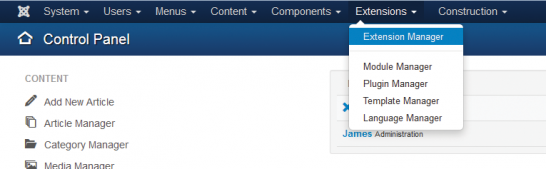 Go to the Extensions - Extensions Manager in Joomla!
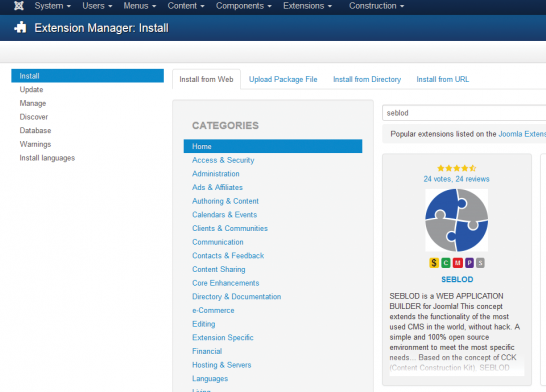 Click on the "Install from Web" tab. You may have to activate this by clicking "Activate install from web tab" if you haven't already. Then, search for "SEBLOD" in the extensions directory.
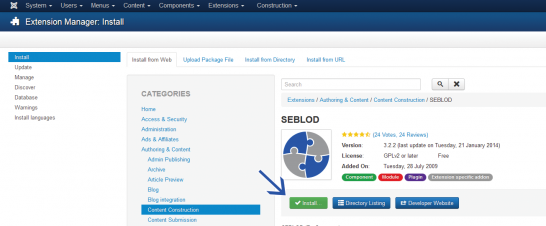 Click the SEBLOD extension, and click "install". You will need to confirm that you want to install the extension on the next screen by clicking "install" again.
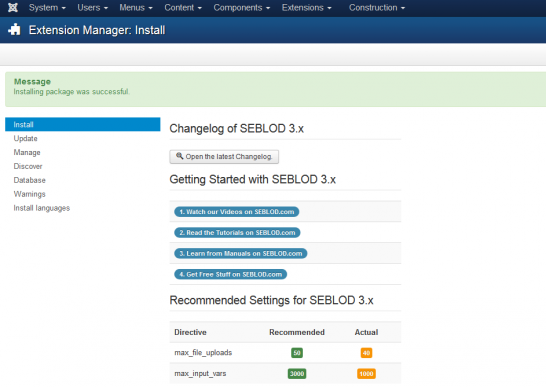 You will get a confirmation message when SEBLOD has been installed successfully.
Please make note of the Recommended Settings for SEBLOD 3.x
To change these settings, locate your php.ini file on your web server and change these values to reflect the following:
max_file_uploads = 50
max_input_vars = 3000
If your web host does not allow you directly edit the php.ini file, you will need to contact them and ask them to make the change for you.
Without these settings, some SEBLOD features may not work properly, particularly forms with many of fields.
Option 2: Install by downloading the SEBLOD installation package
Download the latest SEBLOD software
Save the downloaded file onto your computer so that you can install it via Joomla's Extension Manager.
Install SEBLOD in Joomla!
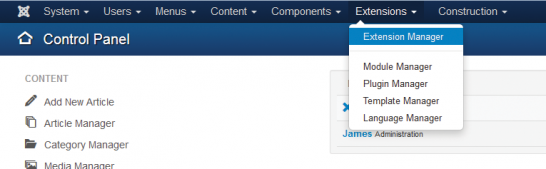 Navigate to the Extension Manager
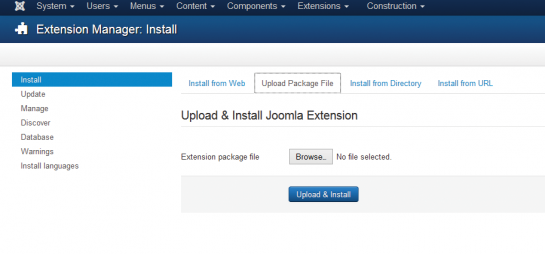 Select the package. Once inside the Extension Manager (see below), in
the Upload Package File section click the Browse button to load the file
from your local drive. Then press the Upload & Install button.
Select the package. Once inside the Extension Manager (see below), in
the Upload Package File section click the Browse button to load the file
from your local drive. Then press the Upload & Install button.
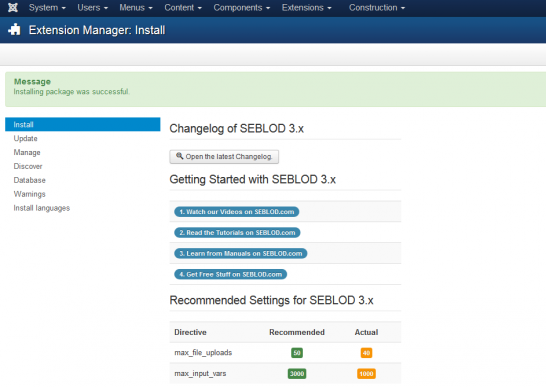 Give it time, the amount will depend on your internet connection.
When complete you will be see an "Install Component Success" message
confirming the success of the installation.
Give it time, the amount will depend on your internet connection.
When complete you will be see an "Install Component Success" message
confirming the success of the installation.
Please make note of the Recommended Settings for SEBLOD 3.x
To change these settings, locate your php.ini file on your web server and change these values to reflect the following:
max_file_uploads = 50
max_input_vars = 3000
If your web host does not allow you directly edit the php.ini file, you
will need to contact them and ask them to make the change for you.
Without these settings, some SEBLOD features may not work properly, particularly forms with many of fields.
Recommended next steps
- Delete your browser cache (if updating a previous version of SEBLOD)
- Verify that the Seblod Content plugin is the first in the list of Content plugins . Go to Extensions > Plug-in Manager, select at the top right (J2.5) or left (J3.x) “content” from the dropdown list to filter by content plugins. Finally, verify that the “Content – Seblod” plugin is in first position or change it to be.
Alternative Install Method
- Unzip SEBLOD package using your favorite software into a new folder on your desktop
- Rename that new folder to Seblod (or any name that you prefer)
- Upload the Seblod folder to your Joomla /tmp directory using your FTP software
- Go to the Extension Manager
- In the Install from Directory field, do not delete what is there. At the end, after /tmp simply type /seblod (or whatever you called the folder). Example, if you have: /var/www/web1/web/tmp change it to : /var/www/web1/web/tmp/seblod
- Click on Install button
Requirements
| Software | Recommended | Minimum | More information |
|---|---|---|---|
| PHP* | 5.6 + or 7 + | 5.3.10 | www.php.net |
| MySQL** | 5.5.3 + | 5.1 | www.mysql.com |
| Apache***(with mod_mysql, mod_xml, and mod_zlib) | 2.x + | 1.3 | www.apache.org |
| Microsoft IIS**** | 7 | 6 | www.iis.net |
| PHP GD Library****(used for image thumb generation) | 5.3 + | 5.2 | www.php.net |
| Browser |
For admin: Firefox 4+ or Opera 10+
For Site: IE7+, Firefox 3+, Safari 4+, Opera 11.10 |
Firefox, Opera, Safari, Internet Explorer | |
Uninstall the SEBLOD
- Go on Extensions => Extension Manager
- On the left, Click on the Manage menu
- Select Package option in the Type filter
- Check SEBLOD (App Builder & CCK) box and click on Uninstall button
SEBLOD installieren
- Die Mindestvoraussetzung für die Installation von SEBLOD 3.x ist Joomla! 2.5 - jedoch empfehlen wir Ihnen dringend die neueste Version von Joomla 3.x zu nutzen um die volle Funktionalität von SEBLOD auszuschöpfen.
- Sollten Sie noch SEBLOD 2.x nutzen, aktualisieren Sie die Version Ihres CCK auf SEBLOD 3.x. Mehr über die Aktualisierung von SEBLOD finden Sie im Update Handbuch.
- Um mehr über die Installation und Einrichtung von Joomla! zu erfahren besuchen Sie die Webseite der offiziellen Joomla! Dokumentation.
- Für die Installation von SEBLOD 3.x sind "Super Administrator" Rechte erforderlich. SEBLOD wird über den Punkt Erweiterungen > Erweiterungen im Backend mit Hilfe des Uploads eines Zip-Paketes installiert.
- Für eine genaue Liste von Änderungen lesen Sie bitte den SEBLOD Changelog.
Erstellen Sie Backups!
Wie bei anderen Arbeiten an Ihrer Webseite, empfehlen wir auch hier immer ein Backup der gesamten Webseite durchzuführen, bevor Sie eine neue Erweiterung installieren.
Das betrifft nicht nur die Datenbank, sondern auch die gesamte Datenstruktur auf Ihrem Webhost. Sollte ihre Webseite im Produktiveinsatz sein, ist es sinnvoll neue Erweiterungen auf einer Entwicklungsseite zu testen, bevor Sie Änderungen an der Live-Seite vornehmen. Sicherheit geht vor - ein Backup zu viel ist besser als eines zu wenig!
Wir können Ihnen die Komponente Akeeba Backup wärmstens ans Herz legen um Backups an Ihrer Joomla Seite durchzuführen.
Möglichkeit 1: Installation durch Joomlas „Aus Webkatalog installieren“ Funktion
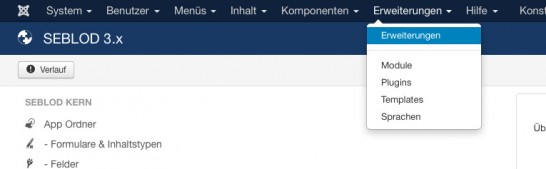 Klicken Sie auf Erweiterungen > Erweiterungen in Joomla!
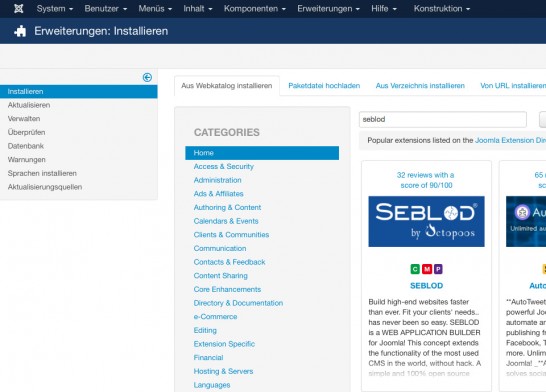 Klicken Sie auf den „Aus Webkatalog installieren“ Reiter - Möglicherweise müssen Sie vorher den „Aus Webkatalog installieren“ Tab hinzufügen.
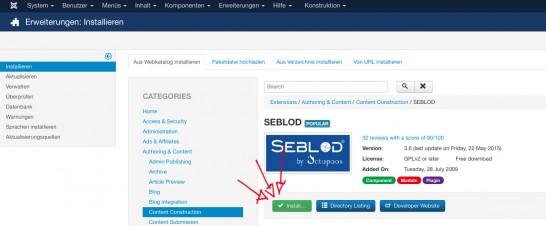 Suchen Sie nach „SEBLOD“ im Webkatalog, wählen Sie es aus und klicken Sie anschließend auf „installieren“.
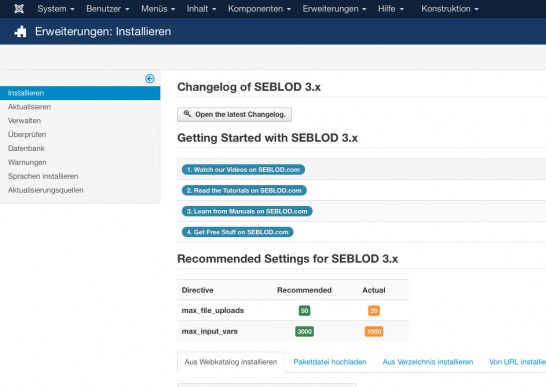 Nach erfolgreicher Installation von SEBLOD erscheint eine Meldung.
Bitte beachten Sie die empfohlenen Voraussetzungen für SEBLOD 3.x
Um diese Einstellungen zu verändern, müssen Sie die php.ini Datei folgendermaßen anpassen:
max_file_uploads = 50
max_input_vars = 3000
Sollte ihr Hostinganbieter keine direkte Bearbeitungsmöglichkeit der php.ini Datei vorsehen, fragen Sie einfach bei Ihrem Dienstleister nach ob er diese Einstellungen für Sie vornehmen kann.
Ohne diese Einstellungen, könnte es sein, dass die SEBLOD Funktionen beeinträchtigt sind - insbesondere beim Einsatz von vielen Feldern.Möglichkeit 2: Installation durch Download des SEBLOD Installationspaketes
SEBLOD Installation in Joomla
Klicken Sie im Adminmenü auf Erweiterungen > Erweiterungen
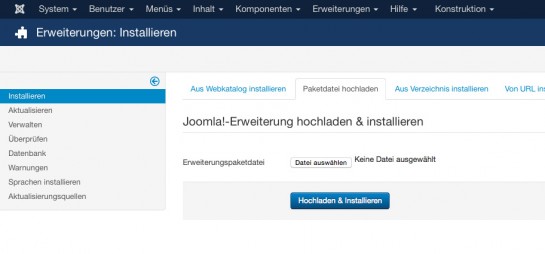 Klicken Sie auf den zweiten Reiter „Paketdatei hochladen“ und anschließend auf "Datei auswählen" bzw. Durchsuchen und wählen Sie das zuvor heruntergeladene Paket aus. Anschließend klicken Sie auf Hochladen und Installieren.
Warten Sie bis die Installation abgeschlossen ist, diese kann abhängig von Ihrer Internetverbindung einige Zeit in Anspruch nehmen. Nach erfolgreicher Installation von SEBLOD erscheint eine Meldung.
Bitte beachten Sie die empfohlenen Voraussetzungen für SEBLOD 3.x
Um diese Einstellungen zu verändern, müssen Sie die php.ini Datei folgendermaßen anpassen:
max_file_uploads = 50
max_input_vars = 3000
Sollte ihr Hostinganbieter keine direkte Bearbeitungsmöglichkeit der php.ini Datei vorsehen, fragen Sie einfach bei Ihrem Dienstleister nach ob dieser die Einstellungen für Sie vornehmen kann.
Ohne diese Einstellungen, könnte es sein dass die SEBLOD Funktionen beeinträchtigt sind - insbesondere beim Einsatz von vielen Feldern.
Empfohlene weitere Schritte
- Leeren Sie Ihren Browser Cache, falls Sie von einer früheren Version von SEBLOD aktualisiert haben.
- Stellen Sie sicher, dass das SEBLOD Content Plugin das erste Plugin in der Content Plugin Liste ist.
Gehen Sie auf Erweiterungen > Plugins, wählen Sie bei Joomla 2.5 oben rechts oder bei Joomla 3.x bei den Filtern auf der linken Seite
„Content“ bei "Typ auswählen" aus um nach Content Plugins zu filtern. Klicken Sie auf die Reihenfolge-Pfeile, stellen Sie sicher, dass das Content SEBLOD Plugin an erster Stelle ist - oder verschieben Sie es an die erste Stelle.
SEBLOD ist bereits so konfiguriert, dass Sie sofort loslegen können. Zum Test können Sie einen neuen Artikel anlegen und sich das Formular dafür ansehen, welches über Komponenten > SEBLOD 3.x > Formular und Inhaltstypen > "Article" angepasst werden kann. Wir hoffen dass Sie großen Nutzen aus den Funktionen von SEBLOD ziehen und unsere Komponente Ihre Bedürfnisse abdeckt!
Alternative Installationsmöglichkeit
- Entpacken Sie das komprimierte SEBLOD Paket mit Ihrer gewohnten Software und benennen Sie den daraus entstehenden Ordner "Seblod" (oder wie auch immer Sie möchten)
- Laden Sie den entpackten Ordner in das /tmp Verzeichnis von Joomla mit Hilfe Ihres FTP Programmes hoch.
- Gehen Sie im Admin Menü auf Erweiterungen > Erweiterungen
- Im Tab „Aus Verzeichnis installieren“ löschen Sie bitte nicht die voreingetragenen Werte. Am Zeilenende nach /tmp schreiben Sie /Seblod (bzw. den Namen des Ordners, den Sie ins /tmp Verzeichnis hochgeladen haben) Beispiel: Wenn in dem Feld var/www/web1/web/tmp steht, ändern Sie diesen zu /var/www/web1/web/tmp/seblod
- Klicken Sie auf Installieren
Systemvoraussetzungen
| Software | Empfehlung | Minimum | Weitere Informationen |
|---|---|---|---|
| PHP* | 5.6 + or 7 + | 5.3.10 | www.php.net |
| MySQL** | 5.5.3 + | 5.1 | www.mysql.com |
| Apache***(mit mod_mysql, mod_xml, and mod_zlib) | 2.x + | 1.3 | www.apache.org |
| Microsoft IIS**** | 7 | 6 | www.iis.net |
| PHP GD Library****(für die Generieung von Thumbnails) | 5.3 + | 5.2 | www.php.net |
| Browser |
Für den Admin: Firefox 4+ or Opera 10+
For Site: IE7+, Firefox 3+, Safari 4+, Opera 11.10 |
Firefox, Opera, Safari, Internet Explorer | |
SEBLOD deinstallieren
- Gehen Sie auf Erweiterungen -> Erweiterungen
- Im Menü links, klicken Sie auf "Verwalten"
- Wählen Sie bei den Filtern unter "Typ wählen" den Wert „Paket“. Klicken Sie auf das Kontrollkästchen neben SEBLOD (App Builder & CCK) und klicken Sie anschließen oben auf deinstallieren.
übersetzt von: Elisa Sophia Foltyn
Ich bin Dipl. Kommunikationswirtin und ambitionierte Mediengestalterin für Digital- und Printmedien. Basis meiner Arbeit ist die Entwicklung von individuellen Kommunikations- und Designkonzepten und die anschließende Realisierung. Ich beschäftige mich seit 2006 mit Joomla! - In den Anfängen nutzte ich die Komponente K2 als CCK für die Umsetzung von Kundenprojekten die einen spezifischen Funktionsumfang verlangten. Durch einen befreundeten Programmierer lernte ich schließlich 2011 SEBLOD kennen und lieben. Einerseits kann ich mit SEBLOD meinen Kunden eine einfachere Eingabemöglichkeit für Inhalte bieten, auf der anderen Seite gibt SEBLOD mir die Möglichkeit leistungsstarke Applikationen ohne große Programmieraufwände zu erstellen.
Installer SEBLOD
- Pour installer SEBLOD 3.x, vous devez avoir au moins Joomla 2.5, mais nous conseillons d'utiliser le dernier package Joomla 3.x pour tirer le meilleur parti de SEBLOD.
- Si vous utilisez SEBLOD 2.x, mettez à jour votre version de CCK pour passer à SEBLOD 3.x. Pour en savoir plus sur la mise à jour de SEBLOD, consultez le manuel Comment mettre à jour .
- Pour en savoir plus sur l'installation et la configuration de Joomla, consultez la documentation sur le site officiel de Joomla!.
- L’installation de SEBLOD 3.x nécessite un accès super administrateur et l'installation se fait en utilisant le gestionnaire d’extension en téléchargeant un fichier de package unique.
- Pour visualiser la liste des changements entre les différentes versions, consultez l’historique des modifications de SEBLOD 3.x .
Sauvegarde de votre site Web
Comme avant n’importe quelle modification que vous apportez à votre site Web, vous devrez toujours sauvegarder l’ensemble de votre site avant d'installer le nouveau logiciel. Cela devrait comprendre non seulement la base de données, mais également le système de fichiers. Si votre site est un site de production, vous voudrez peut-être tester le nouveau logiciel sur un site d'essai avant de faire les changements sur votre site de production. Il vaut mieux être prudent plutôt que de regretter.
Si vous êtes à la recherche d'un composant de sauvegarde pour Joomla, le projet Akeeba Backup est parfait pour commencer.
Option 1: Installer en utilisant la fonctionnalité Joomla "Install from Web"
Installer SEBLOD dans Joomla!
Allez dans le gestionnaire d’extension de Joomla!
Allez dans l’onglet "Extension" puis cliquez sur "Extension Manager"
Cliquez sur l’onglet "Install from Web". Vous pourriez avoir à l'activer en cliquant sur "Activate install from web tab" si vous ne l'avez pas déjà. Ensuite, recherchez "SEBLOD" dans le répertoire d'extensions.
Cliquez sur l'extension SEBLOD, et cliquez sur "Install". Vous devrez confirmer que vous voulez installer l'extension sur l'écran suivant en cliquant à nouveau sur "Install".
Vous aurez un message de confirmation lorsque SEBLOD aura été installé avec succès.
Prenez en considération les paramètres recommandés pour SEBLOD 3.x.
Pour modifier ces paramètres, retrouver votre fichier php.ini sur votre serveur Web et modifier ses valeurs afin de refléter ce qui suit:
max_file_uploads = 50
max_input_vars = 3000
Si votre hébergeur ne vous permet pas d'éditer directement le fichier php.ini, vous aurez besoin de les contacter et leur demander de faire le changement pour vous.
Sans ces paramètres, certaines fonctionnalités de SEBLOD peuvent ne pas fonctionner correctement, plus particulièrement les formulaires avec beaucoup de champs.
Option 2: Installer en téléchargeant le package d'installation SEBLOD
Télécharger le dernier logiciel SEBLOD
Téléchargez le logiciel officiel SEBLOD 3.x
Sauvegardez le fichier téléchargé sur votre ordinateur afin de pouvoir l’installer via le gestionnaire d’extensions de Joomla!
Installer SEBLOD dans Joomla!
Accédez au gestionnaire de contenu.
Sélectionnez le package. Une fois dans le gestionnaire d'extension (voir ci-contre), dans la section "Upload Package File" cliquez sur le bouton "Browse" pour charger le fichier sur votre disque local. Appuyez ensuite sur le bouton "Upload & Install".
Donnez-lui le temps de charger, le temps d’installation
dépendra de votre connexion internet. Une fois terminé, vous verrez un message
de confirmation d’installation.
Prenez en considération les paramètres recommandés pour SEBLOD 3.x.
Pour modifier ces paramètres, retrouver votre fichier php.ini sur votre serveur Web et modifier ses valeurs afin de refléter ce qui suit:
max_file_uploads = 50
max_input_vars = 3000
Si votre hébergeur ne vous permet pas d'éditer directement le fichier php.ini, vous aurez besoin de les contacter et leur demander de faire le changement pour vous.
Sans ces paramètres, certaines fonctionnalités de SEBLOD peuvent ne pas fonctionner correctement, plus particulièrement les formulaires avec beaucoup de champs.
Les prochaines étapes recommandées
- Supprimez le cache de votre navigateur (si mise à jour d'une version antérieure de SEBLOD)
- Vérifiez que le plugin de contenu SEBLOD est le premier dans la liste des plugins de contenu . Aller dans Extensions > Plug-in Manager, sélectionnez en haut à droite (J2.5) ou à gauche (J3.x) "content" dans la liste déroulante pour filtrer par plugins de contenu. Enfin, vérifiez que le plugin "Content – Seblod" est en première position ou modifiez pour qu’il le soit.
SEBLOD est déjà configuré de telle sorte que vous pouvez commencer à l'utiliser immédiatement. Juste pour le plaisir, créez un nouvel article, et vous verrez le nouveau formulaire (peut être personnalisé en éditant le type de contenu "article"). Nous espérons que vous allez faire un grand usage de SEBLOD et qu'il répondra à vos besoins.
Méthod alternative d'installation
- Décompressez le package SEBLOD en utilisant votre logiciel préféré dans un nouveau dossier sur votre bureau
- Renommez ce nouveau dossier Seblod (ou tout autre nom que vous préférez)
- Téléchargez le dossier Seblod dans votre répertoire Joomla /tmp en utilisant votre logiciel FTP
- Accédez au gestionnaire d’extension
- Dans le champ "Install" du répertoire, ne supprimez rien de ce qui est déjà là. A la fin, après /tmp il suffit de taper /Seblod (ou le nom que vous avez choisi pour le dossier).Par exemple, si vous avez: / var /www /web1 /web /tmp modifiez pour : /var /www /web1 / web /tmp /Seblod
- Cliquez sur le bouton "Install"
Exigences
| Logiciel | Recommandé | Minimum | Informations supplémentaires |
|---|---|---|---|
| PHP* | 5.6 + or 7 + | 5.3.10 | www.php.net |
| MySQL** | 5.5.3 + | 5.1 | www.mysql.com |
| Apache***(with mod_mysql, mod_xml, and mod_zlib) | 2.x + | 1.3 | www.apache.org |
| Microsoft IIS**** | 7 | 6 | www.iis.net |
| PHP GD Library****(used for image thumb generation) | 5.3 + | 5.2 | www.php.net |
| Browser |
For admin: Firefox 4+ or Opera 10+
For Site: IE7+, Firefox 3+, Safari 4+, Opera 11.10 |
Firefox, Opera, Safari, Internet Explorer | |
Désinstaller SEBLOD
Désinstallez SEBLOD 3.x comme toute autre extension de Joomla!
- Allez dans "Extensions" => "Extension Manager"
- Sur la gauche, cliquez sur le menu "Manage"
- Sélectionnez l'option "Package" dans le filtre "Type"
- Cochez la case SEBLOD (App Builder & CCK) et cliquez sur le bouton "Uninstall"